¶ Purpose
The Bank Statement Entry is used to record and maintain details of bank transactions as per the bank statement. It allows users to update deposits, withdrawals, charges, and other bank activities to ensure that the system’s bank balance matches the actual bank balance.
¶ Prerequisites
The following transactions must be completed before the Bank Statement Entry transaction.
- The Bank Name with Bank Account Number must be created.
- The Bank Statement must be prepared.
- Access rights must be assigned to the responsible user for the Bank Statement Entry transaction.
¶ Bank Statement Entry
The Bank Statement Entry screen allows the user to add bank statement details based on the bank and date.
Navigation: Main – Menu → Transactions → Finance → Finance Entries → Finance → Financial Year Selection → Show List → Bank/Cash → Bank Statement Entry.
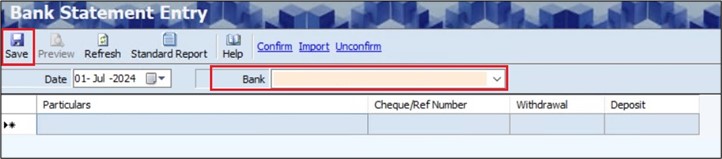
- The Bank Statement Entry screen displays the Date.
- The user can edit the Date, if required.
- The user must select the particular Bank from the dropdown list.
- The user must enter the Particulars.
- The user must enter the Cheque / Reference Number.
- The user must enter either the Withdrawal Amount or the Deposit Amount.
- The user can add multiple transaction details, if required.
- Click Save, and the following message will appear.

- Click OK.
¶ Confirm Bank Statement Details
The Confirm link allows the user to confirm the added details of the bank statement.

- The user must select the appropriate Date and Bank from the dropdown list.
- The user must select the appropriate entry.
- Click Confirm, the following message will appear.

- Click Yes, to confirm details.
- The user can also right-click on the transaction grid and select Confirm details, as shown below.

¶ Un-confirm Bank Statement Details
The Unconfirm link allows the user to unconfirm the confirmed details of the bank statement.

- The user must select the appropriate Date and Bank from the dropdown list.
- The user must select the appropriate entry.
- Click Unconfirm, the following message will appear.

- Click Yes, to unconfirm the confirmed details.
- The user can also right-click on the transaction grid and select Unconfirm details, as shown below.

¶ Import from Excel
The Import link allows the user to add details of multiple withdrawals or deposits at once using an Excel file.

- The Bank Statement Entry screen displays the Date.
- The user can edit the Date, if required.
- The user must select the particular Bank from the dropdown list.
- Click the Import link, the following screen will appear.
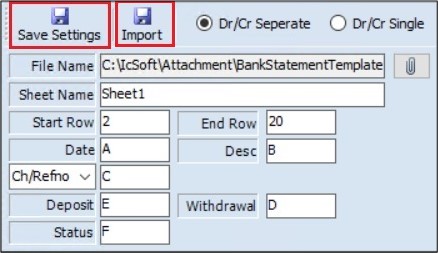
- If the user selects the Dr/ Cr Separate option, the user must enter details of the Deposit and withdrawal.
- If the user selects the Dr/ Cr Single option, the following screen will appear, and the user must enter details of the Dr/ Cr and Trans. Amount.
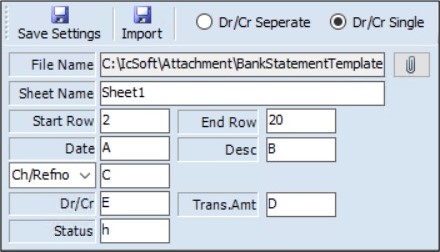
- Click the Attachment icon, to select the appropriate Excel file.
- The user must enter details, such as the Sheet Name, which must be the same as the name of the Excel sheet.
- The user must enter details of the field name of the Excel column in its relevant field, such as the Start Row, End Row, Date, Ch/ RefNo., Desc, Deposit or Dr/ Cr, Withdrawal or Trans. Amount and Status.
- Click Save Settings, the following message will appear.

- Click OK.
- Click Import, the following message will appear.

- Click OK.
- If any errors occur, they will be displayed in the newly generated Excel sheet, as shown below.

¶ Functional Use Cases
| Sl No. | Use Case | Business Scenario | Functional Outcome in ERP |
|---|---|---|---|
| 1 | Manual Bank Statement Entry | User manually enters bank statement transactions. | ERP stores statement lines for reconciliation without affecting ledgers. |
| 2 | Bank Statement Import (Excel) | The bank statement is available in Excel format. | ERP imports statement lines in bulk for reconciliation. |
| 3 | Statement Confirmation | Uploaded/entered bank statement needs user confirmation. | ERP locks statement data and marks it ready for reconciliation. |
| 4 | Validation of Statement Data | Errors like duplicate entries or invalid amounts exist. | ERP validates and highlights errors before confirmation |
| 5 | Multiple Statement Uploads | Statements are uploaded periodically (daily/monthly). | ERP maintains statement-wise history with upload reference. |
| 6 | Edit Unconfirmed Statement | Corrections required before final confirmation. | ERP allows modification of unconfirmed statement entries. |
| 7 | Prevent Reconciliation Before Confirmation | Reconciliation attempted on unconfirmed statement. | ERP restricts reconciliation until the statement is confirmed. |
¶ Use Case Scenario
- Click here for a detailed use case scenario.
¶ Transaction Checklist
| Step No. | Checklist Item | Details / Purpose |
|---|---|---|
| 1 | Confirm Bank Master Details | Verify that the Bank Name and Bank Account Number are defined correctly in the Bank Master. |
| 2 | Create Bank Statement | Confirm that the Bank Statement record has been created for the relevant period. |
| 3 | Check Financial Year Selection | Verify that the correct Financial Year is selected in the system before performing the entry. |
| 4 | Assign User Access Rights | Ensure the responsible user has the necessary access rights for the Bank Statement Entry transaction. |
| 5 | Verify Excel File (if Import Required) | If using the Import from Excel option, confirm that the file format, sheet name, and column headers match the required system template. |
| 6 | Ensure Bank Reconciliation Status | Check that there are no pending reconciliations that could affect the current bank statement entry. |
| 7 | Final Verification | Ensure all deposits, withdrawals, and imports are accurately reflected in the bank ledger. |