¶ Purpose
The Partys Bank Details screen allows the user to add or edit the banking information of a party.
¶ Prerequisites
The following transactions must be completed before the Party's Bank Details transaction.
- The Party Master needs to be defined. Party can be a customer or a vendor.
- Access rights must be assigned to the responsible user for the transaction.
¶ Partys Bank Details
The Partys Bank Details screen allows the user to add or edit the bank details of a particular party.
Navigation: Main – Menu → Transactions → Finance → Finance Entries → Finance → Financial Year Selection → Show List → Masters → Partys Bank Details
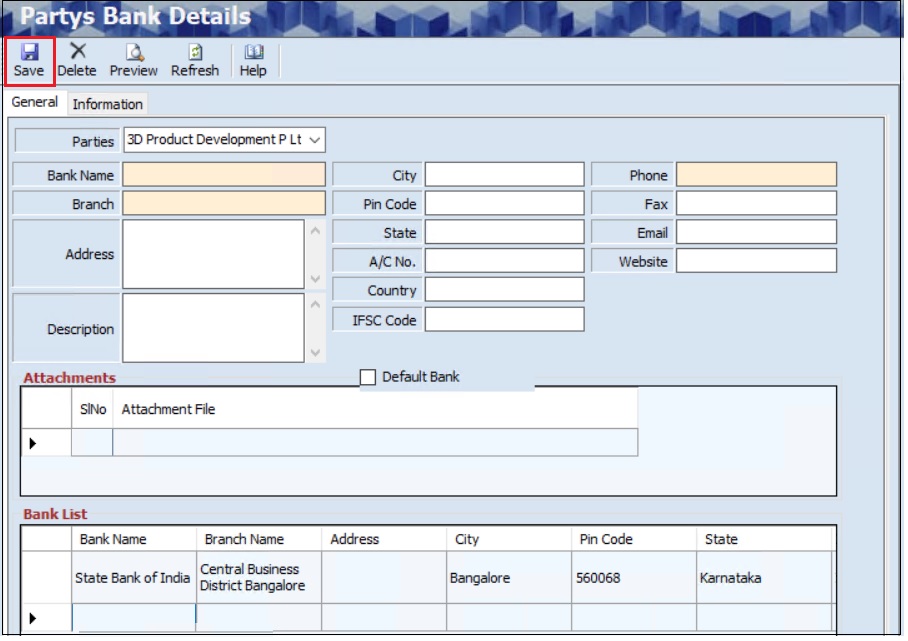
- The user can search for a particular party’s bank details based on the Party.
- The Partys Bank Details screen allows the user to enter the details in two tabs, as mentioned below.
- General
- Information
- The General screen allows the user to enter the details in three sections, as mentioned below.
- General
- Attachments
- Bank List
- The General section allows the user to add bank details for the selected party.
- The user must select the Parties from the dropdown list.
- The user must enter the Bank Name.
- The user must enter the Branch.
- The user must enter the Phone Number.
- The user can enter the Address, Description, City, Pin Code, State, Account No., Country, IFSC Code, Fax, Email and Website details.
- The user can select the Default Bank checkbox to set the selected bank as the default bank.
- The Attachment section allows the user to upload attachments if required.
- The Information screen displays details such as the Internal Verified (Employee Name), Made On Bank (Employee Name) and Bank Verified.

- Click Save, the following message will appear.

- Click Yes, the following message will appear.

- Click OK, and the Bank Details will appear in the Bank List section.
¶ Delete Option
The Delete option allows the user to delete added or existing Bank details if further or subsequent transactions are not executed.
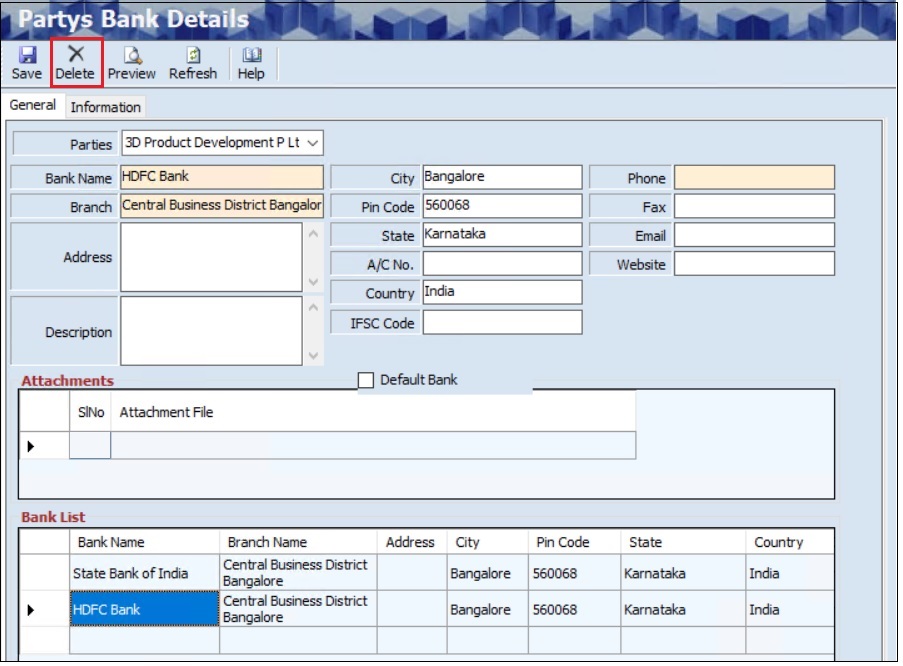
- The user can select the appropriate Parties from the dropdown list if required.
- Once the user selects the Party, the Bank List section will appear.
- The user must select the particular Bank from the Bank List section.
- Once the user selects the Bank, details such as the Bank Name, Branch Name, Address, Description, City, Pin Code, State A/C No, Country, IFSC Code, Phone, Fax, Email and Website will appear automatically.
- Click Delete, the following message will appear.
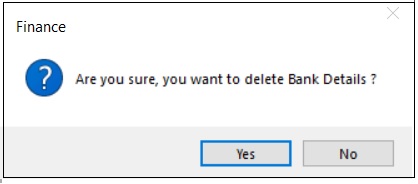
- Click Yes, to delete the party’s bank details.
¶ View or Print Bank Details of Party
The Preview option allows the user to print or email the added or existing party’s bank details.
- The user can select the appropriate Parties from the dropdown list if required.
- Once the user selects the Party, the Bank List section will appear.
- The user must select the particular Bank from the Bank List section.
- Once the user selects the Bank, details such as the Bank Name, Branch Name, Address, Description, City, Pin Code, State A/C No, Country, IFSC Code, Phone, Fax, Email and Website will appear automatically.
- Click Preview, the following screen will appear.
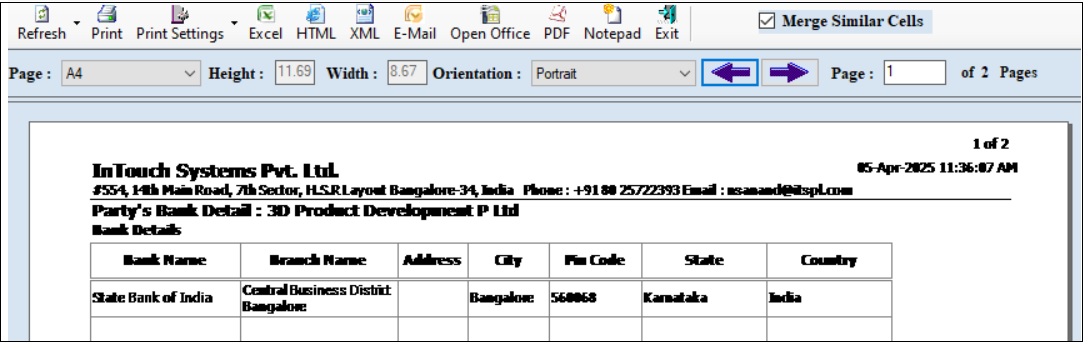
- Click Print, to print documents.
- Click Preview, to view details before printing.
- The user can view details in Excel, HTML, Open Office, PDF and Notepad format.
- Click Email, the following screen will appear.
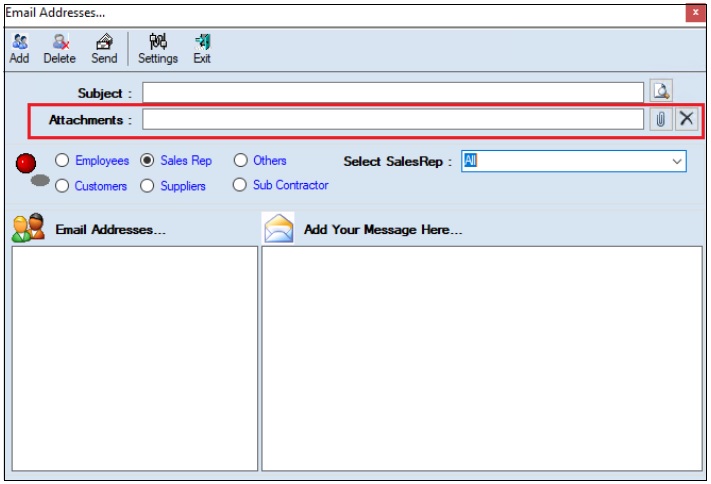
- The user must enter the Subject.
- The user can upload multiple attachments if required.
- The user can delete the uploaded attachments if required.
- The user must select one of the options from Employees, Customers, Sales Rep, Suppliers, Subcontractors or Others.
- Once the user selects the appropriate option, the corresponding Email IDs will appear in the Email Address section.
- The Add Your Message Here section allows the user to add messages.
- Click Send, to send emails.
- Click Add, to add the new email address.
- Click Delete, to remove the selected mail ids.
- Click Settings, the following screen will appear.
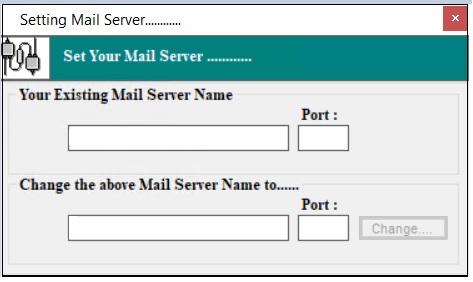
- The user must enter details of the Your Existing Mail Server Name, Port (Existing), Change the above Mail Server Name To and Port (New).
- Click Change.
¶ Functional Use Cases
| SL No. | Use Case | Business Scenario | Functional Outcome |
|---|---|---|---|
| 1 | Add or Edit Bank Details | The user adds or edits the bank details of a party to maintain updated financial information. | The system saves or updates the party’s bank details for future financial transactions. |
| 2 | Delete Bank Details | The user deletes incorrect or obsolete bank details of a party. | The system removes the selected bank details from the party’s record. |
| 3 | View or Print Bank Details | The user views, prints, or exports the bank details of a party for reference or documentation. | The system displays, prints, or exports the selected bank details in the chosen format. |
| 4 | Email Bank Details | The user sends the party’s bank details to employees, customers, suppliers, or other stakeholders. | The system emails the bank details with attachments to the selected recipients. |
| 5 | Set Default Bank | The user sets a specific bank as the default for a party to streamline transactions. | The system assigns the selected bank as the default bank for the party. |
¶ Use Case Scenario
- Click here for a detailed use case scenario for the Partys Bank Details transaction.
¶ Transaction Checklist
| Steps | Checklist Item | Details / Purpose |
|---|---|---|
| 1 | Verify Party Master | Ensure the Party Master is defined before performing the bank details transaction. |
| 2 | Check User Access Rights | Confirm that access rights are assigned to the responsible user. |
| 4 | Enter or Edit Bank Details | Fill in or update the Bank Name, Branch, Account No., IFSC Code, Address, etc. |
| 5 | Upload Attachments (if required) | Attach relevant documents related to the bank details. |
| 6 | Set Default Bank (if required) | Mark the bank as the default bank for the party, if applicable. |
| 7 | Verify Saved Information | Confirm that the entered bank details appear in the Bank List section. |
| 8 | Delete Bank Details (if needed) | Select the bank, click Delete, and confirm to remove incorrect data. |
| 9 | View or Print Bank Details | Use the Preview option to view, print, or export details in various formats. |
| 10 | Email Bank Details (if needed) | Select recipients, attach files, and click Send to share via email. |