¶ Purpose
The Financial Year screen enables users to enter specific financial year details. Each financial year is divided into four quarters, namely Q1, Q2, Q3 and Q4.
¶ Prerequisites
- Access rights must be assigned to the responsible user for the Financial Year transaction.
¶ Financial Year
The Financial Year screen allows the user to add details of the current financial year.
Navigation: Main – Menu ⇢ Transactions ⇢ Finance ⇢ Finance Entries ⇢ Finance ⇢ Financial Year Selection ⇢ Show List ⇢ Masters ⇢ Financial Year
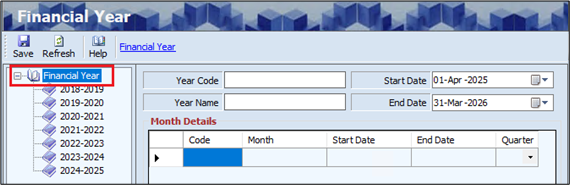
- The user can view details of a particular financial year based on Financial Year (Year Name) from the left panel of the screen.
- Click the Financial Year from the left panel of the screen.
- The Financial Year screen is divided into two sections as mentioned below.
- Year Details
- Month Details
- The Year Details section displays details such as the Start Date and End Date.
- The user can edit the Start Date and End Date details if required.
- The user must enter details of the Year Code and Year Name.
- Click the Financial Year link, the Month Details will appear as shown below.
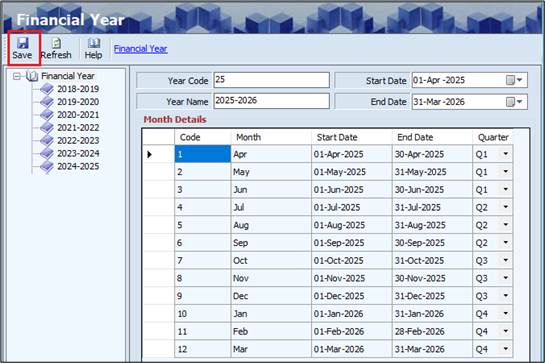
- The Month Details section displays details such as the Code, Month, Start Date, End Date and Quarter based on the previous year's data.
- Click Save, and the Year Name will appear on the left panel of the screen.
Note: The user must update the prefix for all modules and locations at the beginning of every financial year using the Update Prefix From last link. Below is the navigation for updating the prefix.
Navigation: Main – Menu ⇢ Masters- System ⇢ System Administration ⇢ Show Tree ⇢ Tools ⇢ Prefix Combination Setting
¶ Functional Use Cases
| SL No. | Use Case | Business Scenario | Functional Outcome in ERP |
|---|---|---|---|
| 1 | Define Financial Year | The organisation begins a new fiscal year and needs to configure its duration and quarters. | The system allows the user to define the financial year, including start/end dates and quarters. |
| 2 | Edit Financial Year | The user needs to update the start or end date of an existing financial year. | The user can modify Year Code, Year Name, Start Date, and End Date. Updated data is saved. |
| 3 | View Financial Year | The finance team wants to verify the existing financial years set up in the system. | The system displays the list of configured financial years in the left panel. |
| 4 | Define Monthly Breakdown | The system needs to automatically segment the year into months and assign quarters. | The Month Details section populates Code, Month, Start/End Dates, and Quarter automatically. |
| 5 | Save Financial Year Details | The user completes the financial year setup and confirms it. | The system saves the configuration and displays the year name in the navigation panel. |
¶ Use Case Scenario
- Click here for a detailed use case scenario for the Financial Year.
¶ Transaction Checklist
| Steps | Checklist Item | Details / Purpose |
|---|---|---|
| 1 | Verify user access rights | Ensure the user has the required permissions to access the Financial Year master. |